Pages

Friday, April 16, 2021

TAM request for Escalation SR

Escalation request must be send to

  • GS-TS-CRK-REM <GS-TS-CRK-REM@VMWARE.COM>
  • GS-TS-AMER-REM <gs-ts-amer-rem@vmware.com>
  • Technical Support Engineer (TSE) owning SR
  • Manager of TSE
  • Manager of TAM

EMAIL TEMPLATE 

Email Subject Line: Account Name/ SR Number/ Situation
Example: ABC Bank/ 1234567/ VC Down P1
Email Body:
VMware SR Number:
EA Name:
Product Name:
Customer Temperature:
Support Entitlement:
Issue Description/ Issue summary:
Escalation Justification/ Business impact (Example: Production Down situation/ Deal Pending/ Executive Visibility/ Critical Timeline or Deadline/ Any other important information):
Customer ask/ requested action:

Email should looks like following example ... 

Hello REM teams,

I work as TAM for Ceske Radiokomunikace and I’m in touch with TSE (Danijel).

We need traction on this PR 2742319 from Engineering team.

[SR#] 21207723903


[SR Severity]: P1 

[PR#] 2742319

[PR Priority]: P0

[SR Open Date]: 3/24/2021 5:59 AM CET


[PR/JIRA Open Date]: 2021-03-25 04:48:13 Pacific 

[Customer Account Name] Czech Radiocomunications


[Entitlement]: Production Support Agreement

[Product Name]: vSphere with Kubernetis 

[Product Version]: vCenter version 7.0U2 with NSX-T 3.1.1

[Environment Type]: Production

[Production down?]: No but new deployments impacted 


[Brief description of the issue / customer background]:
The customer is the biggest Cloud Service Provider here in Czechia offering also CaaS with VMware vSphere Tanzu.

His end users creating TKG guests clusters via vCloud Director are impacted.

It was identified that it is not the vCloud Director problem but vSphere with Tanzu problem.  

The problem is with creating new clusters directly in vcenter via kubectl.

Some TKG clusters are deployed successfully, but some deployments fail.

[Business Justification and Impact]: It has a business visibility and impacting cloud provider significantly. It is negatively impacting growth of CaaS service and also the brand name of VMware Tanzu (Kubernetes) product.


[Has EE Reviewed?]: yes

[Manager & Sr. Manager]: 

GSS Org - Kevin Garland, Donal Hosey EMEA

TAM Org - David Ginzberg, Amanda Hill EMEA

Thank you
David

-- 

David Pasek, VMware - Staff TAM (Technical Account Manager)

Email: dpasek@vmware.com Mobile: +420 602 525 736

Zoom Personal Meeting Room: https://VMware.zoom.us/my/dpasek Password: 344040

Personal blog: http://vcdx200.com


Customer Experience is very important to us.

Please forward any feedback about myself to my manager David Ginzberg (dginzberg@vmware.com)


Sunday, April 11, 2021

Install NGINX on FreeBSD + Letsencrypt SSL Certificates

OS Update

freebsd-update fetch

freebsd-update install

Package update

pkg update

Install and configure NGINX

pkg install nginx

sysrc nginx_enable=YES

NGINX configuration - /usr/local/etc/nginx/nginx.conf

Web content location - /usr/local/www/nginx

Configuration of virtual hosts is documented at https://www.cyberciti.biz/faq/freebsd-nginx-namebased-virtual-hosting-configuration/

Config Example

    # m4k.dpasek.com
    server {
        listen       80;
        listen       443 ssl;
        server_name  m4k.dpasek.com;
        
        ssl_certificate      /usr/local/etc/letsencrypt/live/m4k.dpasek.com/fullchain.pem;
        ssl_certificate_key  /usr/local/etc/letsencrypt/live/m4k.dpasek.com/privkey.pem;
        
        ssl_session_cache    shared:SSL:1m;
        ssl_session_timeout  5m;
     
        ssl_ciphers  HIGH:!aNULL:!MD5;
        ssl_prefer_server_ciphers  on;
    
        location / {
            root   /home/dpasek/www/math4kids;
            index  index.html index.htm;
        }
    }

Other NGINX Resources


SSL Certificates with Letsencrypt.org

# Install certbot
pkg install py37-certbot

# Stop NGINX - this is needed to create new SSL certifiacate
service nginx stop

# Create new SSl Certificate
certbot certonly --standalone
or
certbot certonly --standalone -d example.com
or more domains
certbot certonly --standalone -d yourdomain.com -d www.yourdomain.com

# start NGINX
service nginx start

# SSL Certification renewal automation
put in /etc/periodic.conf
weekly_certbot_enable="YES"
weekly_certbot_service="nginx" # this will stop and start NGINX service during certification renewal
# for more info look at file /usr/local/etc/periodic/weekly/500.certbot-3.7 

# Add the script to restart NGINX in case of certificate renewal
cd /usr/local/etc/letsencrypt/renewal-hooks/deploy/

vi reload_nginx.sh
#!/bin/sh
service nginx reload
:q!
chmod 755 reload_nginx.sh

Friday, March 26, 2021

RSYNC

rsync –a SourceDirectory DestinationDirectory

When you use rsync, the files that get copied will have a modification date of the same date that the rsync command was run. To overcome this, there is another option that you can specify in the rsync command that will preserve the timestamps during the synchronization process.

Without preserving the timestamp, the files will display the modification date and time as the time that the rsync command was run.

To do this, use the –a option instead of –r, like we used in the command above. The –a option will use recursive mode, preserve any symbolic links, preserves file and directory permissions, preserves the timestamp, and preserve the owner and group.  

Source: https://www.techradar.com/how-to/computing/apple/using-rsync-to-keep-your-files-in-sync-1305698


Saturday, March 20, 2021

vIDM Kerberos

VRA 7.4

/usr/local/horizon/conf/domain_krb.properties

 https://kb.vmware.com/s/article/65172?lang=en_US

VRA 8.3

/usr/local/horizon/conf/domain_krb.properties


Thursday, March 4, 2021

Aligning Architecture Framework and Technologies Stack - Benoit Sarda

TOGAF Architecture Development Method (ADM)


TOP-DOWN or BOTTOM-UP Approach?
It depends ....

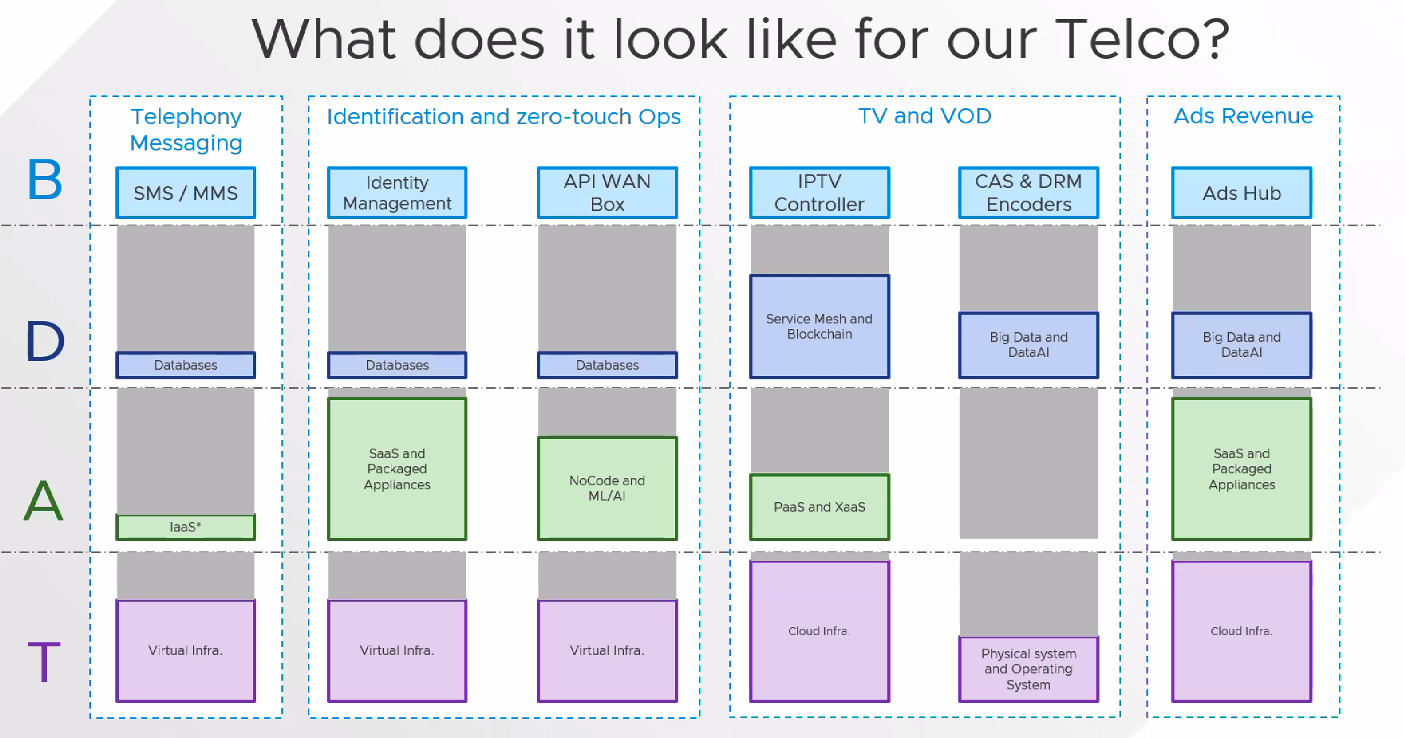
BDAT

  • Business Architecture
  • Data Architecture
  • Application Architecture
  • Technology Infrastructure

Infrastructure Focus Approach


I would personally switch How and What in the figure above.

Technology - The Where


B.D.A.T

BDAT process


3 Key Takeaways